

 By admin
Taking the MRT or bus in Singapore? The Singapore SimplyGo Guide explains how to pay for public transport, choose the right travel card and check your journey expenses. SimplyGo supports eligible contactless bank cards, supported mobile wallets and SimplyGo EZ-Link cards, so you can choose a payment method that suits your travel habits. Singapore residents can use it to manage daily commuting, while tourists can compare payment options before exploring the city. Understanding the fees, app features and correct tapping process can help you avoid common payment problems.
TL;DR — Singapore SimplyGo Guide at a Glance
SimplyGo lets you pay for eligible Singapore MRT and public bus journeys using a compatible contactless bank card, supported mobile wallet or SimplyGo EZ-Link card. You do not need a SimplyGo account just to travel with an eligible bank card. The app helps you check travel history and transactions. Foreign-issued Visa and Mastercard cards incur a S$0.60 daily administrative fee when used for transit, so compare costs before choosing your payment method.
What Is SimplyGo in Singapore?
SimplyGo is Singapore’s public transport e-payment system. It gives commuters different ways to pay for train and bus journeys without relying on a traditional ticket for every trip. Depending on the payment method, you can tap a bank card, use a supported mobile wallet or pay with a compatible travel card.
How SimplyGo Works for Public Transport
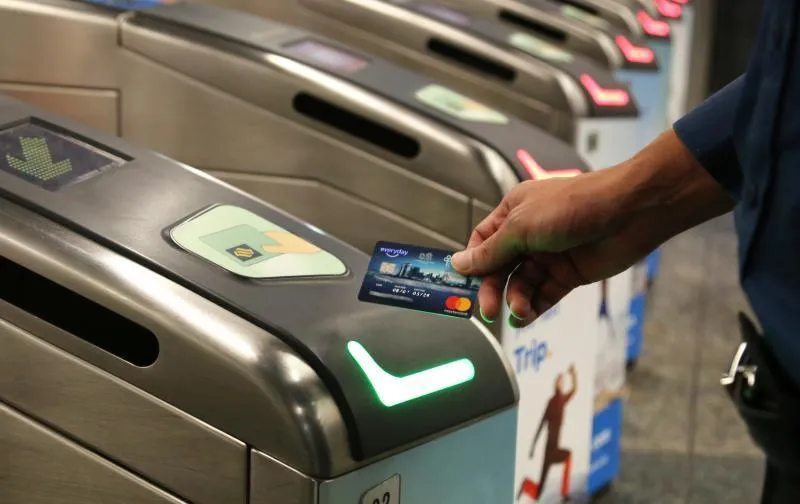
When you enter an MRT station, tap your payment method at the fare gate. On a bus, tap the reader when boarding and again when alighting. The system uses these taps to calculate the applicable fare. Always use the same card or device for both ends of the journey.
Is SimplyGo an App or a Payment System?
It is both a payment system and a service with an app for managing eligible cards and viewing travel records. You can travel with an eligible contactless bank card without registering for an account. Registering through the SimplyGo app gives you access to travel history and transaction information.
How to Use SimplyGo for MRT and Buses
Using SimplyGo is straightforward once you have a supported payment method. Before travelling, check that your card is enabled for contactless payments and that your bank permits public transport transactions.
Paying with a Contactless Bank Card
Eligible contactless Visa, Mastercard, American Express and NETS bank cards can be used for public transport, subject to card-specific restrictions. Foreign-issued Visa and Mastercard cards are accepted, but the daily foreign-card administrative fee applies. Check your bank’s overseas transaction charges as well.
Using Apple Pay, Google Pay or Another Supported Wallet
You can use a compatible card added to a supported mobile wallet. Simply tap your phone or watch at the reader as you would with a physical contactless card. Make sure the selected card is eligible for transit payments. If a payment fails, try the physical card or another supported method.
How to Tap In and Tap Out Correctly
- MRT: Tap at the entry gate and tap again when leaving the station.
- Bus: Tap when boarding and when alighting.
- Use the same payment method: If you enter with a physical card, do not exit using the card stored in your phone wallet.
- These may be treated as different payment credentials.
- Check the reader: Wait for the reader or gate to register your tap before moving on.
Correct tapping helps the system calculate your fare accurately.
SimplyGo vs EZ-Link vs Singapore Tourist Pass
The right option depends on how often you use public transport, whether you already have a compatible bank card and how long you are staying in Singapore.
| Payment option | Main consideration | Suitable for |
|---|---|---|
| Contactless bank card | Pay per journey; foreign-card fees may apply | Residents and visitors with eligible cards |
| SimplyGo EZ-Link card | Stored value; top-ups required | Regular commuters and people who prefer a travel card |
| Singapore Tourist Pass | Unlimited travel on eligible services during its validity period | Tourists planning frequent journeys |
The Singapore Tourist Pass is a separate travel product, not simply another name for SimplyGo. It offers unlimited travel on eligible basic bus services and trains during the pass period. Official sales information lists prices starting from S$17 per day; check the current options and conditions before buying.
For the SimplyGo vs EZ-Link card Singapore comparison, remember that an eligible bank card does not require stored-value top-ups. An EZ-Link card does, so you need to keep enough value available for travel. If you are visiting for only a few days, compare your expected journeys with the Tourist Pass price rather than assuming unlimited travel will always be cheaper.
Singapore SimplyGo Fees, Pricing and Charges
SimplyGo costs depend on the payment method you choose. Standard adult fares still apply when you use a contactless bank card, mobile wallet or SimplyGo EZ-Link card. Concession cards have their own eligibility and fare arrangements.
Foreign Bank Card Administrative Fee
Foreign-issued Visa and Mastercard debit or credit cards incur a S$0.60 administrative fee per day of transit use. Your bank may charge additional foreign transaction or currency conversion fees. Singapore-issued bank cards do not incur this SimplyGo foreign-card fee.

SimplyGo EZ-Link Card Cost and Top-Ups
SimplyGo lists a standard EZ-Link card purchase price of S$10 at selected retail outlets, comprising S$5 in card cost and S$5 in stored value. Check the exact product and seller before purchasing, as availability and terms can differ.
Additional Bank and Currency Conversion Charges
| Fee or cost | Current published information |
|---|---|
| Foreign Visa/Mastercard transit fee | S$0.60 per day of use |
| Standard EZ-Link card purchase at selected outlets | S$10, including S$5 stored value |
| Foreign-card top-up at ticketing kiosks, up to S$30 | S$1.10 convenience fee |
| Foreign-card top-up above S$30 | 4% of the top-up amount |
| Singapore Tourist Pass | From S$17 per day; check current pass options |
The foreign-card top-up fees above apply to topping up a stored-value travel card at the relevant ticketing kiosks, not to tapping a foreign bank card directly for each journey.
These are published charges, not a guarantee that every retailer offers the same product or price. Verify the latest fees before travelling.
How to Set Up and Use the SimplyGo App
The SimplyGo app is useful if you want to track public transport spending, view journey records or manage registered travel cards. You can use an eligible contactless bank card for travel without creating an account, but registration unlocks additional features.
Registering an Account and Linking a Card
Download the SimplyGo app, create an account and follow the on-screen instructions to add an eligible bank or travel card. Keep your login details secure, and make sure the card you register is the one you use for transit.
Checking Travel History, Fares and Transactions
Open your registered card in the app to review available journey history and fare transactions. If a transaction does not appear, allow time for processing and check again. You can also use ticketing service kiosks to view transaction history.
Managing SimplyGo EZ-Link Card Top-Ups
Depending on your card type, you may be able to top up through the app or at supported ticketing kiosks. Follow the instructions for your particular card, as top-up options differ. The official site also states that EZ-Link and SimplyGo EZ-Link card top-ups at AXS Stations will end from 29 August 2026.
Common SimplyGo Problems and How to Fix Them
Why Is My Bank Card Not Accepted?
Check that your card supports contactless payments and is eligible for transit use. Some cards under otherwise supported payment networks are not accepted. If the problem continues, contact your card issuer or use another eligible payment method.
What Does “Multiple Cards Detected” Mean?
This can happen when more than one contactless card or device is presented to a reader. Keep other cards away from the reader and tap only the payment method you intend to use. If you entered with your phone, use that same device to exit.
Why Are My Fare Transactions Missing?
Check the SimplyGo app again after some time, and review your bank statement if you paid by bank card. You can also check transaction history at a ticketing service kiosk. If the fare still appears incorrect, contact SimplyGo support or your card issuer, depending on the payment method.
Frequently Asked Questions
Can tourists use SimplyGo in Singapore?
Yes. Visitors can use eligible contactless bank cards, supported mobile wallets or compatible travel cards to pay for public transport. Check any foreign-card fees before travelling.
Do I need the SimplyGo app to use the MRT?
No. You can use an eligible contactless bank card or supported mobile wallet without registering for a SimplyGo account. The app is useful for checking travel history and managing registered cards.
Is SimplyGo free to use?
There is no requirement to pay for an app account just to tap and travel with an eligible bank card. However, you still pay public transport fares, and some payment methods have additional charges.
Can I use a foreign Visa or Mastercard?
Eligible foreign-issued Visa and Mastercard debit or credit cards can be used, with a S$0.60 foreign bank card administrative fee per day of transit use. Your bank may apply separate charges.
Is SimplyGo better than EZ-Link?
It depends on your needs. Direct bank-card payments avoid travel-card top-ups, while an EZ-Link card lets you use stored value. Compare fees, convenience and your expected travel before deciding.
How do I check my SimplyGo transactions?
Register your eligible card in the SimplyGo app to view available travel history and transactions. Ticketing service kiosks are another option if you cannot access the information in the app.
Final Tips for Using SimplyGo in Singapore
Choose a payment method that suits your trip, check foreign-card fees and always tap in and out with the same card or device. Keep your travel records for reference, and consult official SimplyGo information whenever fees or card rules change.

[…] around Singapore is easy once you understand how its public transport payment system works. This Singapore EZ Link Guide explains how to buy an EZ-Link card, check its cost, top up the balance and use it on the MRT, LRT […]